How to Verify Your Domain Email Address (ICANN Verification)
To prevent your domain from being temporarily suspended or locked, ICANN regulations require you to verify your registrant email address. Please follow these quick steps to complete the process.
Step 1: Check Your Inbox
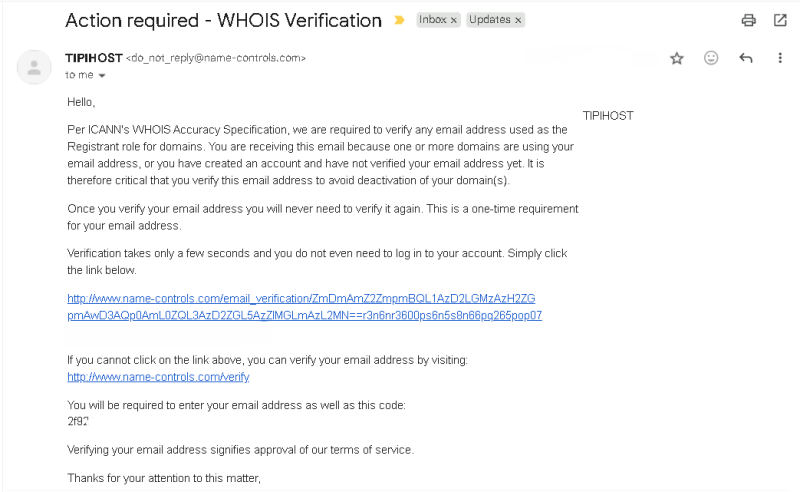
Look for an email sent to your registrant email address.
– Sender: NameSilo / Name-Controls
– Subject Line:
Action required - WHOIS Verification
Step 2: Verify Your Email (Option A - Fastest)
Inside the email, you will find a long verification link. Click on that link. It will look similar to this:
http://www.name-controls.com/email_verification/...
Once you click the link, a new browser tab will open displaying a success message:
If you see “Thanks – your email address has been successfully verified!”, you are all set! Your domain is secure.

Step 3: Manual Verification (Option B - Alternative)
If the main link above does not work, or if your email provider breaks the link, you can easily verify your domain manually using the alternative link provided at the bottom of the email.
Click on the manual verification link:
http://www.name-controls.com/verifyOpen the email again and locate the unique code under the text: “You will be required to enter your email address as well as this code:“
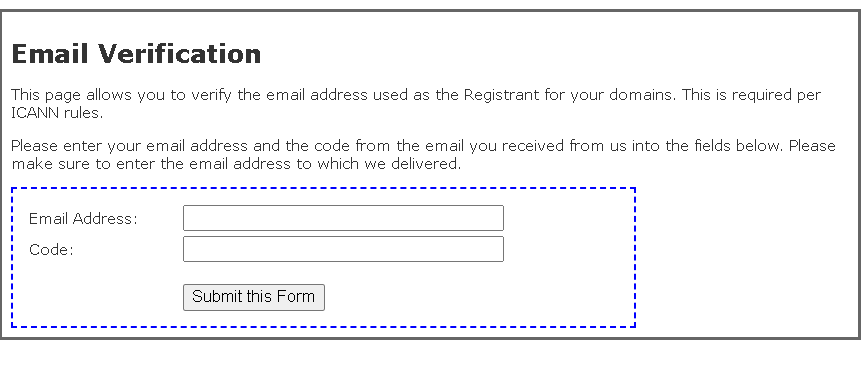
You will be directed to the manual verification form: